


cleveland.com
3.2334.00 Reviews
App Specs
- Version
- 5.0.0
- Updated On
- License
- Free
- Downloads
- 100,000+
- Developer
- cleveland.com
- Categories
- News & Magazines
- Platform
- Android
Screenshots

 Analysis by AppCompare
I approach cleveland.com as a local-news companion rather than an all-purpose newsstand. Its focus is Cleveland-area coverage, which is useful when I want a closer view of the city and surrounding communities than a national news app usually provides. The main question is whether that local focus fits your routine—and whether the app’s day-to-day experience works for you.
Where the reading experience can snag
A local news app is most valuable when it helps me move quickly from a headline to the story I actually want. The cleveland.com app is built around that habit, but I would not assume that every reader will find the same topics equally easy to reach. If you mainly follow one subject, such as local government or Cleveland sports, take a moment to explore how the available sections are organized before relying on the front page alone.
Notifications can be useful, but they also change how an app feels. A steady stream of alerts may interrupt work or a quiet evening, while turning them off means you will need to open the app yourself to check for updates. I would start with alerts disabled or limited, then enable only the kinds of news that genuinely help me act or stay informed. That small choice can make the app feel more like a tool and less like another source of interruptions.
Reading on a phone also calls for a little judgment. A headline and a short preview can tell me whether a story is worth opening, but they are not a substitute for the full report. When I am short on time, I use the front page to identify what matters and save longer reading for a quieter moment. That is a more practical routine than expecting a quick glance to explain every developing local issue.
Setup checks that make a difference
Before judging the app, I would check that the device can run it and that it is up to date. The current version is 4.5.2.2, and the minimum operating-system requirement is Android 8.0. If installation or launch is a problem, checking the device’s available system updates and the app’s store page is a sensible first step; it is better than assuming the news service itself is down.
There is no charge to download the app, though in-app purchases range from $7.99 to $100.00 per item. I would review the purchase screen carefully before confirming anything, especially if I am setting the phone up for a family member or a teenager. The app has a Teen content rating, so it is intended for an older audience rather than young children. Knowing that context before handing over a device makes expectations clearer.
The app is published by cleveland.com, and it has a 2.9 average from around 834 ratings, with over 100,000 installs. That reception is a reason to try it with realistic expectations, not proof that the same experience will suit everyone. I would test the basic reading routine first: open a few stories, look for the sections I care about, and see whether the app fits how I already follow local news.
Worth Reading Before You Choose

EA SPORTS FC Mobile 26 Is a Bigger Football Game, but It Takes Time

Flipboard Shows What News Apps Must Do Beyond the Feed

Switching to Android Auto Means Rethinking Your Driving Routine

Google Calendar Makes a Crowded Week Easier to Manage

Ludo King Makes the Most of the Minutes Between Plans

Baby Panda World Brings Quick Play to Modern Phones, but Its Game Library Feels Busy
Recovering a routine when something feels off
If a story does not load or the app behaves inconsistently, I would work through simple checks before drawing a conclusion. Confirm that the phone has a working connection, close and reopen the app, and try again. If the issue continues, checking for an app update or restarting the device can help distinguish a temporary device problem from a persistent app issue. These are general troubleshooting steps, not a guarantee that every failure will be fixed.
I also find it useful to separate a content question from a technical one. If the app opens normally but a particular story is missing, that does not automatically mean the app is broken; the story may simply not be in the section I first checked. I would browse the available news areas or use the app’s own navigation before repeating the same tap. If the whole app is unresponsive, by contrast, connection and restart checks are more relevant than searching for a headline.
For a reliable reading habit, I would avoid making one alert or one saved story my only route back to an article. If I have a few minutes during a commute or lunch break, I can check the app directly and decide what to read then. That approach is less dependent on a particular notification arriving at the right time, and it keeps my attention on the news I choose to follow.
When the app may not be the cause
Local reporting can change quickly, and a quiet news feed does not always signal a technical fault. The mix of stories depends on what is happening in the region and what I choose to read. If I want broader national coverage, a general news app or a publication with a wider reporting area may be a better fit; a Cleveland-focused app is most useful when local context is the point.
It is also worth considering what you expect from a news source. An app can make reporting easier to access, but it cannot replace checking important details across credible sources when a story affects a serious decision. I treat it as one way to keep up with Cleveland, not as the sole authority for every issue. That is especially sensible when headlines are developing and details may evolve.
Getting to Know cleveland.com
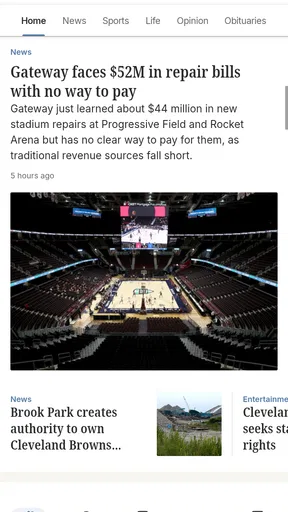
Alright, picture this: you’re sipping your morning coffee, and you want to catch up on the latest news. You fire up the cleveland.com app, and bam! You’re greeted with a sleek interface that screams simplicity and functionality. The layout is clean, making it super easy to navigate, which is a big win in my book.
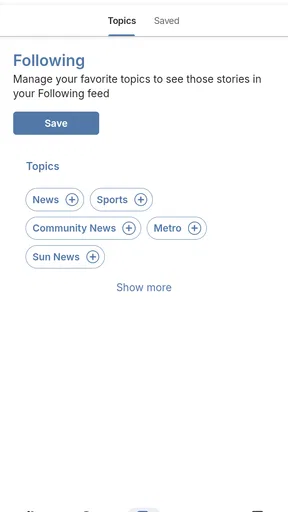
One of the standout features is the personalized news feed. It’s like the app gets to know you and your interests over time. Whether you’re into sports, politics, or local events, you can customize your feed to see what matters to you most. This part really won me over because who wants to scroll through endless stories that don’t pique their interest?
Features That Shine
Let’s dive into some of the features that make this app a must-have for anyone living in or visiting Cleveland. First up, the real-time updates. With notifications enabled, I never miss a beat. Whether it’s breaking news or traffic updates, I’m always in the loop. And trust me, being stuck in traffic without a heads-up is not how you want to spend your day.
The app also boasts a nifty weather section. It’s detailed, accurate, and gives you a heads-up on any weather surprises. So, you can plan your day without worrying if you’ll need an umbrella or not.
Another gem is the local event calendar. If you’re like me and love hitting up local events, this feature is pure gold. It keeps you posted on everything from concerts to community gatherings, ensuring you never miss out on the fun.
User Experience
Now, let’s talk about the user experience. Installing and setting up the app is a breeze. It doesn’t bombard you with obnoxious ads, which is a refreshing change. The interface is intuitive, and the loading times are impressively fast. You’re not left twiddling your thumbs waiting for pages to load, which is a big thumbs up from me.
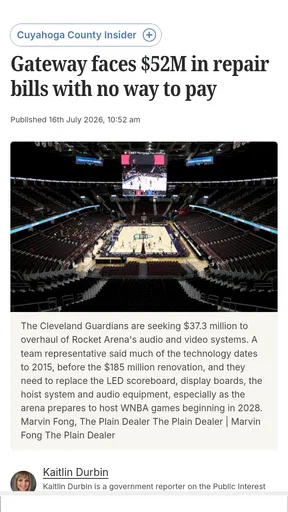
One of my favorite features is the ability to save articles for later. Sometimes life gets busy, and you can’t read everything in one go. This feature lets you bookmark stories, making it easy to catch up whenever you have a moment.
Choosing it for the right reason
For someone who lives in the Cleveland area, the strongest reason to keep this app handy is the local angle. A national news app can cover major events, but it may not give neighborhood-level stories the same attention. I would use cleveland.com when local decisions, community happenings, or regional sports are what I want to follow, then turn to broader outlets when I need a wider view.
It can also make sense for a visitor who wants more than a tourist itinerary. Checking local coverage before choosing what to do can provide a feel for what is happening around the city. The event calendar is a natural starting point for that sort of planning, while the news feed can help put local conversations in context. I would still confirm practical details with the event organizer before setting out, rather than treating a news app as the final word on schedules.
A realistic routine might be to glance at the app over breakfast, open one local story that affects the day, and leave a longer piece saved for later. On a busy afternoon, that is more useful than scrolling without a purpose. If a notification arrives while I am driving or concentrating, I would wait until I am safely stopped; staying informed is not worth diverting attention from the road.
Making local coverage work for you
Personalization is most helpful when it narrows a broad local feed without making it too narrow. I would choose interests that reflect my regular concerns, but still check the main feed occasionally so that an unexpected city issue does not disappear from view simply because it is outside my usual topics. That balance is a small but worthwhile trade-off: a more relevant stream can save time, while too much filtering can leave blind spots.
Saved articles are useful for more than postponing a long read. I would use them to keep a short reading queue: one story to finish at lunch, another to revisit after a meeting, and then clear out items that are no longer relevant. This avoids relying on memory or reopening the same sections to find a piece again. It also gives the app a role in a deliberate routine instead of encouraging endless browsing.
For readers comparing it with a newspaper’s website, a general news aggregator, or a social feed, the difference is focus. An aggregator can gather many publishers in one place, and social platforms can surface conversations quickly, but both may mix local reporting with content that is less relevant or harder to assess. A Cleveland-centered publication is more direct when local coverage is the priority. The trade-off is that it is not designed to replace a broad range of national and international sources.
I would also keep expectations measured around alerts. They are convenient for time-sensitive local developments, but they are not a complete digest of everything happening in Cleveland. If you prefer a calm, scheduled reading habit, opening the app at set times may suit you better than enabling every notification. If you depend on immediate updates, alerts can complement that habit, but I would still check the app itself for context rather than relying on a brief phone banner.
Who should look elsewhere
This is not the right choice if your main goal is one unified feed of national headlines, international reporting, and multiple publications. A larger general news service will usually make more sense for that. It may also be a poor fit if you rarely want Cleveland-area coverage; an app can be well suited to its subject and still add little value to someone whose interests lie elsewhere.
Readers who prefer to avoid in-app purchases should take a careful look at any purchase prompt before proceeding. The app is free to download, but that does not mean every possible in-app option is free. I would not tap through a payment screen casually, and I would make sure anyone else using the device understands the difference between installing the app and choosing an in-app purchase.
If the app’s reported average gives you pause, I would treat that as a prompt to test it for your own needs rather than a final verdict. News habits vary: someone who wants local sports and community coverage may judge it differently from a reader expecting a polished all-in-one national briefing. Try the sections you care about and pay attention to whether the reading experience is dependable enough for your routine. A short, practical trial is more informative than assuming the rating predicts your personal experience.
Final Thoughts
In conclusion, the cleveland.com app is a powerhouse for anyone looking to stay informed about all things Cleveland. It’s user-friendly, packed with features, and genuinely feels like it enhances my connection to the city. Whether you’re a local or just visiting, this app is a handy companion that keeps you in the know.
If you haven’t already, give it a try. It’s available on both Android and iOS, and trust me, you won’t regret it. It’s like having Cleveland in your pocket, ready to spill all its secrets whenever you need them. Happy exploring!
Pros
- Comprehensive local news coverage.
- User-friendly interface design.
- Real-time sports updates.
- Customizable notifications.
- Access to exclusive content.
Cons
- Occasional app crashes reported.
- Ads can be intrusive.
- Limited offline reading options.
- Subscription required for full access.
- Slow load times during peak hours.
FAQs for cleveland.com
What is cleveland.com and what features does it offer?
Cleveland.com is a digital news platform providing the latest news, sports updates, entertainment, and lifestyle content focused on Cleveland and Northeast Ohio. The app offers real-time updates, personalized news feeds, and interactive features like commenting and sharing. Users can also access multimedia content, including photos and videos, for a comprehensive news experience.
Is cleveland.com free to use, or are there any subscription options?
Cleveland.com is free to download and use, offering a range of content at no cost. However, there may be premium content or features available through a subscription service. This could include ad-free browsing or exclusive articles. Users should check the app for detailed information on any available subscription plans and pricing.
Can I customize the news feed on cleveland.com to match my interests?
Yes, cleveland.com allows users to personalize their news feed to focus on topics they are most interested in. By selecting preferred categories such as sports, politics, or entertainment, users can tailor their experience. This customization helps ensure that users receive the most relevant news updates directly in their feed.
Does cleveland.com provide notifications for breaking news?
Cleveland.com does offer push notifications to keep users informed of breaking news and important updates. Users can customize the type of notifications they receive, ensuring they only get alerts for the news categories they care about. This feature keeps users connected with real-time information without overwhelming them with unwanted alerts.
How does cleveland.com ensure the accuracy and reliability of its news content?
Cleveland.com employs a team of professional journalists and editors dedicated to delivering accurate and reliable news. The platform follows journalistic standards and ethical guidelines to ensure the credibility of its content. Additionally, cleveland.com often cites sources and provides context to help users understand the news, fostering transparency and trust.


